LiveNow on Chrome and Edge

Your AI chats, saved and turned into action.

Save ChatGPT, Claude, Gemini and Grok conversations in one click, find any answer instantly, export to Markdown or PDF, and turn the best parts into notes and tasks.

Chrome with Enhanced protection may say “not trusted by Enhanced Safe Browsing”. That’s normal for new developers, and it’s safe to choose Continue to install. Why?

  • ChatGPT
  • Claude
  • Gemini
  • Grok
  • 100% local
  • No account, no tracking
  • Free for 50 chats
ChatCairn · Library
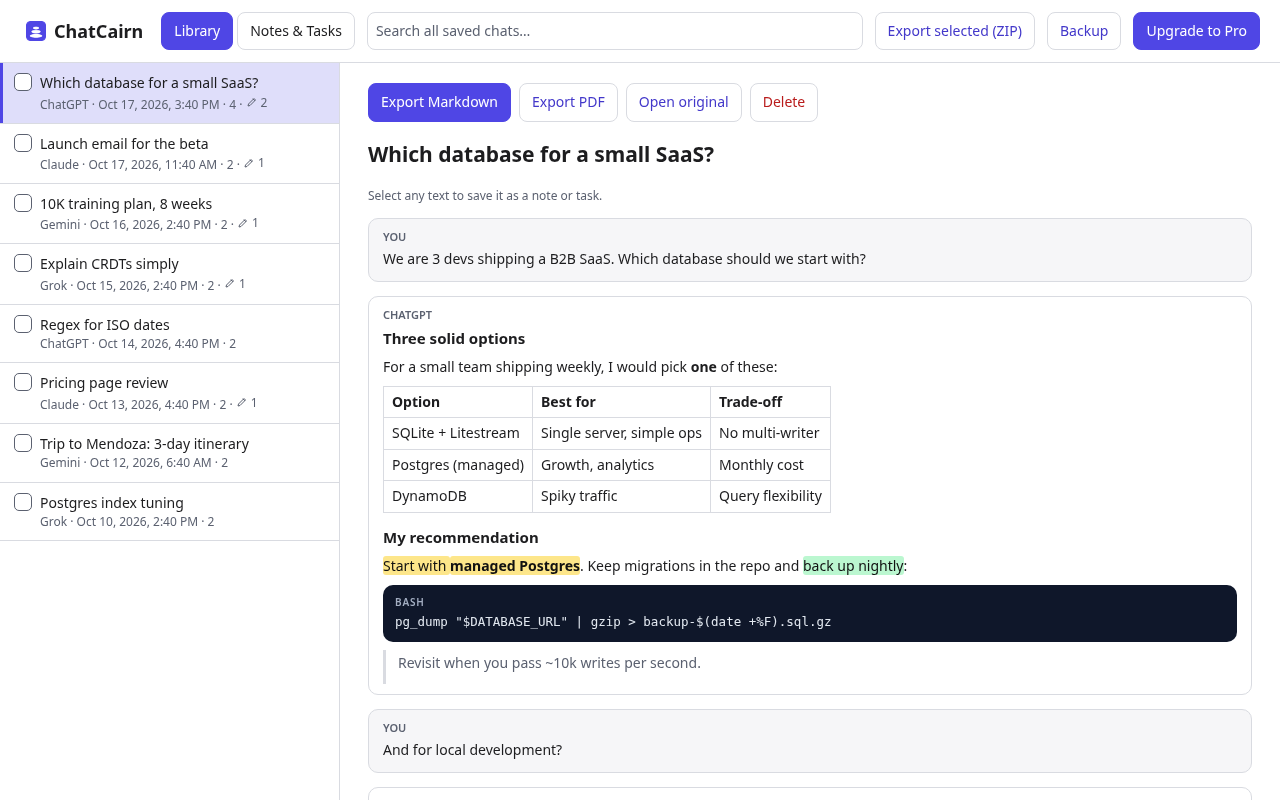
ChatCairn library: saved chats from ChatGPT, Claude, Gemini and Grok with a rendered conversation
Features

What is ChatCairn?

ChatCairn is a browser extension for Chrome and Edge, for people who use ChatGPT, Claude, Gemini and Grok. It saves chats into one local, searchable library, exports them to Markdown or PDF, and turns highlights into notes and tasks. Your chats stay in your browser: no account and no ChatCairn server.

Notes & tasks from highlights New in 0.3

Select any passage right in ChatGPT, Claude, Gemini or Grok and keep it as a note or a task with a project, due date and comment, without saving the whole conversation. It works in saved chats too. Filter by Overdue, Today or Upcoming, and jump back to the source in one click. Tasks export in Obsidian Tasks syntax.

One-click save

Save the open conversation from ChatGPT, Claude, Gemini or Grok: your prompts and the answers, with code, tables and headings intact.

Search everything

Full-text search across every chat you saved, on every platform, plus a home view of what you saved lately.

Markdown, PDF & ZIP

Markdown with front-matter for Obsidian and Notion, clean paginated PDFs, or a ZIP of your whole library.

Private, with backups

Everything stays in your browser: no account, no ChatCairn servers, no analytics. One-click backup and merge-restore keep it safe. GPT Rescue also saves the Custom GPTs and Gems you created, free: How to export your Custom GPTs and Gems.


How it works

Three clicks, no setup.

01

Open a chat

On chatgpt.com, claude.ai, gemini.google.com or grok.com.

02

Click Save

From the ChatCairn button in your toolbar. Saving again updates it in place.

03

Highlight right in the chat

Turn any passage into a note or task, with a project and due date, without saving the whole conversation.

04

Find, export, act

Search the library, export Markdown or PDF, and tick tasks off.

Pricing

Generous free plan. Simple Pro.

Start free. Upgrade when ChatCairn becomes part of your workflow. Prices as of Oct 2026.

Free

$0forever

  • All 4 platforms
  • Up to 50 saved chats
  • Up to 10 notes & tasks
  • Search, Markdown & PDF export (with a small “Made with ChatCairn” footer)
  • JSON backup & restore

New-developer warning in Chrome? Continue to install is safe. Why?

Pro

$4.99/ monthor $39 once

Prices in USD as of Oct 2026. Cancel monthly anytime; lifetime is a one-time payment.

  • Save past 50 chats
  • More than 10 notes & tasks
  • Bulk ZIP export of your whole library
  • Remove the ChatCairn footer from exports
  • Google Drive auto-backup Coming soon
  • One key, up to 3 browsers

Secure checkout by Lemon Squeezy (merchant of record), prices in USD, 14-day refund on request, and your license key arrives by email.


FAQ

Questions, answered.

Which browsers does it work in?

Desktop Google Chrome (Chrome Web Store) and Microsoft Edge (Edge Add-ons). Mobile browsers don't support extensions like this.

Why does Chrome say “not trusted by Enhanced Safe Browsing”?

With Enhanced protection on, Chrome shows “Proceed with caution” for extensions from developers it doesn’t know yet. Google says new developers generally take a few months to become trusted. ChatCairn is reviewed and published on the Chrome Web Store and Edge Add-ons, and your chats stay on your device, so it’s safe to choose Continue to install.

Where are my chats stored?

Only in your browser (IndexedDB and extension storage). ChatCairn has no servers that receive your conversations. See the privacy policy.

How does ChatCairn read a conversation?

When you click Save, it reads that one chat from the page. On ChatGPT and Claude it may ask the site itself for the same conversation using your existing login, read-only. Nothing is sent anywhere else.

Monthly or lifetime?

Both unlock the same Pro features. Monthly is $4.99, cancel anytime, or pay $39 once for lifetime (prices as of Oct 2026). One key activates up to 3 browsers.

Where do I find my license key?

In your Lemon Squeezy receipt email (subject “Your ChatCairn Pro … receipt”) and in My Orders at app.lemonsqueezy.com. Paste it in ChatCairn → Activate license.

What happens at the free limit?

Everything you saved stays available to read, search and export. Upgrade to keep saving new chats and notes.

Contact

Feedback or a site that broke?

AI sites change often. Tell us and we usually ship a fix within days.