This tab
Where you’ve been in the current tab, newest first, with times. Click any page to go back to it; Ctrl/Cmd-click opens it in a new tab.
 NewNow on Microsoft Edge · free
After a restart, an update or a crash, each tab comes back with only a handful of Back pages: Chrome keeps just 6 per tab. BackTrail keeps every tab’s full Back history in the side panel, and brings it back.
Free · Google Chrome and Microsoft Edge (desktop).
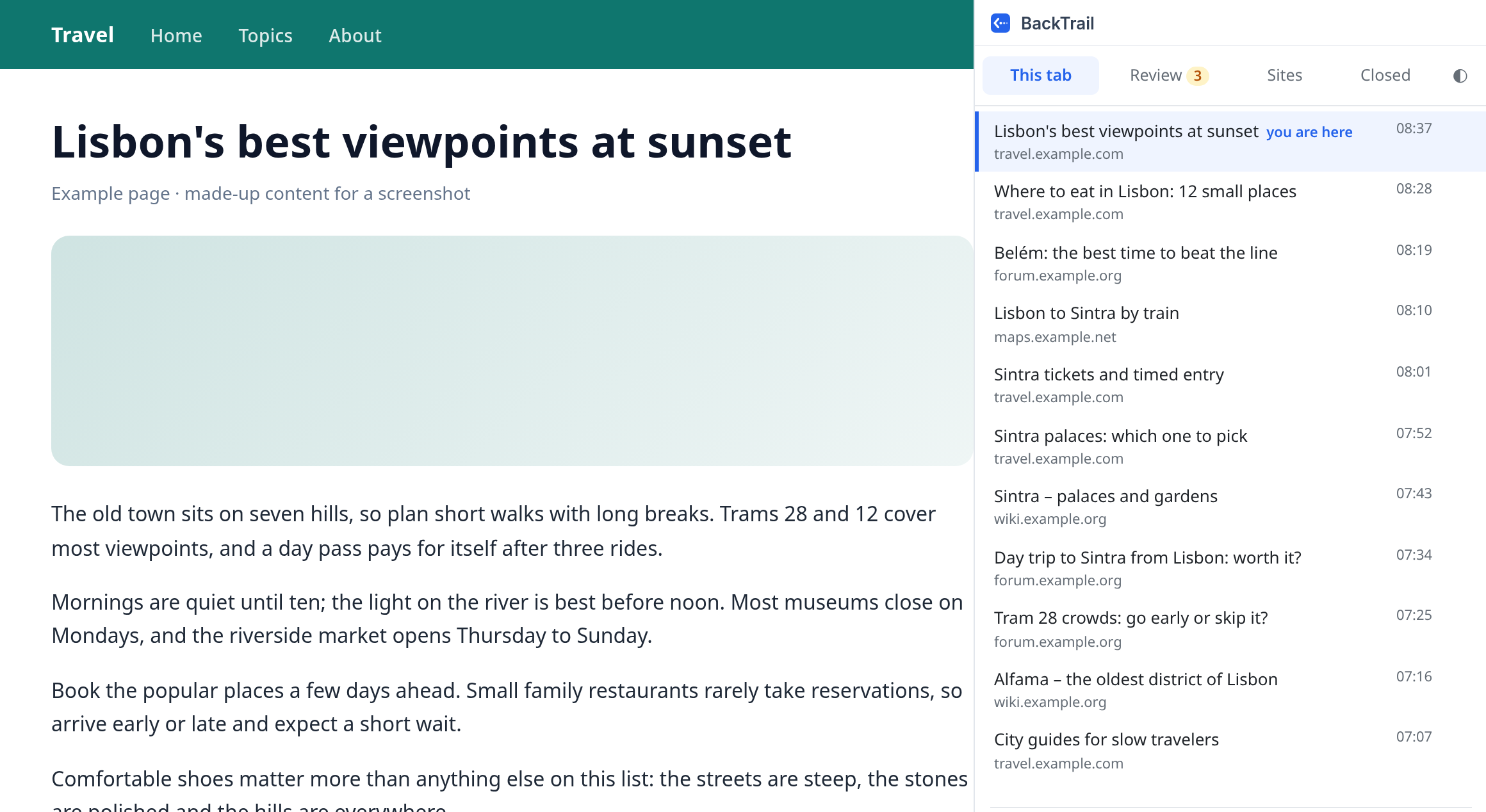
BackTrail is a free browser extension for Google Chrome and Microsoft Edge that remembers the full Back history of every tab, shows it in the side panel and keeps it across browser restarts. It stores only page addresses, titles and times, in your browser; your history is never sent anywhere.
Hours of reading behind a tab no longer disappear when the browser restarts.
Where you’ve been in the current tab, newest first, with times. Click any page to go back to it; Ctrl/Cmd-click opens it in a new tab.
Quit, update or crash: each tab keeps its whole trail, matched to the tab that comes back.
Right after install, tabs you already had open get their past back from your browser’s own history files, read on your computer.
Tabs with more Back history than the browser keeps (shown as +N), so you can finish what’s pending before you quit.
Tabs open on the same address. Keep the one with the most history and close the rest.
The tabs you used since you opened the browser, for a quick pass before quitting, or every open tab by site to free memory.
Tabs you closed in the last 7 days (90 with Pro), with their history. Reopen brings the tab back with its trail.
No account, no analytics, and your history never leaves your browser. Reads addresses and titles, never page content.
Add BackTrail to Chrome or Edge. Tabs you already have open can get their earlier history back.
The side panel shows this tab’s Back history. Click a page to go back to it.
After a restart, an update or a crash, every tab still has its whole trail.
BackTrail stays free. Pro is an optional one-time upgrade for when you want everything back, every time.
USD 0
USD 15one-time payment · no subscription · up to 3 browsers
BackTrail Pro: coming very soon. Install the free version now; Pro unlocks in the same extension with a license key.
Secure checkout by Lemon Squeezy, our merchant of record. Your license key arrives by email: open BackTrail, click “Pro” at the bottom and paste it. 14-day refund on request.
Only the license key goes over the network (to Lemon Squeezy, to activate it and about once a week to check it). Your history never leaves your browser.
Google Chrome and Microsoft Edge on desktop. Available on Microsoft Edge now: get it from Edge Add-ons. It also works in Google Chrome; the Chrome Web Store listing is in review.
No. It stores the address, title and time of the pages you open in each tab, only in your browser, and never reads page content. Your history is never sent anywhere. See the privacy policy.
When Chrome restores tabs after a restart, it keeps only the last 6 Back pages of each tab. BackTrail keeps up to 500 per tab and shows them in the side panel.
Right after install, it rebuilds the past of tabs that were already open from your browser’s own history, and, if you choose them, its History and session files. They are read inside the extension, on your computer, and never leave it.
7 days (90 with BackTrail Pro), then they are deleted automatically. You can delete any of them earlier from the panel.
Yes, and it stays free: live Back history for every tab, Review, Duplicates, Sites, Closed, the full recovery scan and recovery of 3 tabs. No account and no ads. BackTrail Pro (USD 15, one-time payment, up to 3 browsers) recovers all tabs, again after any restart or crash, closes tabs in bulk beyond the free 3 a day and keeps Closed 90 days.
Tell us. Every message is read, and the common ones decide what we fix next.