Everything in one ZIP
One file per meeting with the summary, action items as a checklist, chapters, key questions, topics and the full transcript with speakers and timestamps. Plus an index.csv with one row per meeting.
 LiveVersion 0.2.2 now on Chrome and Edge
MeetCrate uses Read AI’s official API to save all your transcripts, summaries and action items as Markdown, TXT, SRT or JSON, in one ZIP on your computer.
Also on Microsoft Edge
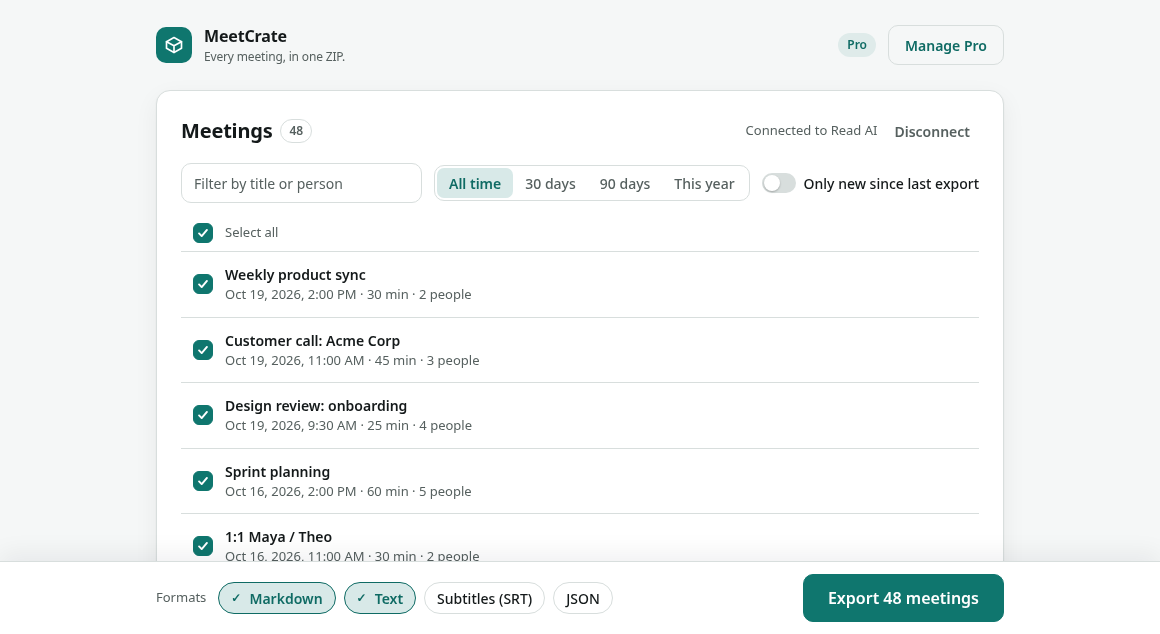
MeetCrate is a browser extension for Read AI users (on Google Chrome and Microsoft Edge) that exports every meeting at once (transcripts, summaries and action items as Markdown, TXT, SRT or JSON in one ZIP) through Read AI’s official, read-only sign-in. Files are created on your computer; nothing is sent to an LGD Ventures server.
Read AI downloads meetings one at a time. MeetCrate exports all of them at once, ready for Obsidian, Notion, Drive or a plain folder.
One file per meeting with the summary, action items as a checklist, chapters, key questions, topics and the full transcript with speakers and timestamps. Plus an index.csv with one row per meeting.
Markdown with YAML front matter for Obsidian and Notion, plain text, subtitles with speaker names, and the raw API JSON so nothing is lost.
Next time, export just the meetings you haven’t exported yet. Ideal for a weekly backup.
Close the tab or lose Wi-Fi and the export continues where it stopped. Meetings still processing are skipped and retried in one click.
You sign in on Read AI’s own page. Files go straight from Read AI to your computer: no MeetCrate account, no servers, no analytics.
Sign in on Read AI’s page and allow read-only access to your meetings.
All of them, a date range, or only what’s new. Markdown, TXT, SRT and/or JSON.
Unzip into your notes app or keep it as a backup. Run it again any time.
No subscription. One payment unlocks your whole archive. Prices as of Oct 2026.
$0forever
$29one-time
Price as of Oct 2026. Pay once, no subscription.
Secure checkout by Lemon Squeezy (merchant of record). Prices in USD. 14-day refund on request. Your license key arrives by email.
How MeetCrate compares with Read AI’s own download, copy and paste, and other exporters.
Google Chrome (Chrome Web Store) and Microsoft Edge (Edge Add-ons), version 0.2.2.
Any plan, including Free. MeetCrate uses Read AI’s official API, which is available on all Read AI plans, and only reads meetings your account can already see.
Read AI’s Download button saves one meeting report at a time, with no multi-select. MeetCrate exports all your meetings in one ZIP: one file per meeting in Markdown, TXT, SRT or JSON, plus an index.csv with one row per meeting. Next time, it can export only the meetings you haven’t exported yet.
Copy and paste works for a meeting or two, but you open, copy, name and save each one by hand. MeetCrate does every meeting at once and keeps the structure: speakers and timestamps, the summary, action items as a checklist, chapters and topics, with each file named by date and title.
It depends on what you need. Both export in bulk, both export your 10 most recent meetings for free, and both cost $29 one-time for the rest (prices checked Oct 2026). MeetingVault uses your existing Read AI login in the browser and saves Markdown, CSV or JSON. MeetCrate connects through Read AI’s official sign-in with read-only access, and also saves plain text and SRT subtitles.
Free exports your 10 most recent meetings, as often as you like. Pro is $29 one-time (as of Oct 2026), with no subscription: export all your meetings, not just the last 10, on up to 3 browsers. Launch offer: the code LAUNCH20 takes 20% off for the first 50 buyers.
Yes, within 14 days of purchase. Reply to your receipt or email lgdventures.hq@gmail.com.
No. You sign in on Read AI’s own page; MeetCrate gets a read-only token that stays in your browser. Meetings go straight from Read AI to your computer. See the privacy policy.
Title, date, duration, platform, participants, summary, action items, chapters, key questions, topics and the full transcript with speakers and timestamps (when Read AI has them).
Yes. The Markdown files have YAML front matter and a checklist for action items. Drop the folder into an Obsidian vault, or use Notion’s Markdown import.
Read AI is supported today. Tell us which tool you need next at lgdventures.hq@gmail.com.
Tell us and we usually ship a fix within days.